


Common Sense Media
4.6106.00 Reviews
App Specs
- Version
- 1.15.0
- Updated On
- License
- Free
- Downloads
- 100,000+
- Developer
- Common Sense Media
- Categories
- Parenting
- Platform
- Android, iOS
Screenshots

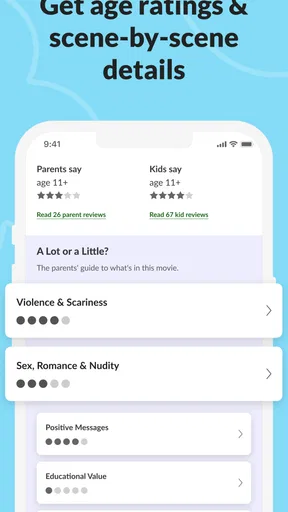
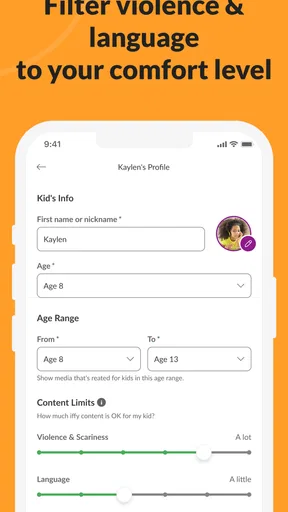

 Analysis by AppCompare
For a parent choosing a film on the fly, the hardest part is often not finding something to watch but working out whether its content will suit the people in the room. I find Common Sense Media most useful as a decision-making aid: it helps families look beyond a title’s genre or trailer and think about what children may actually encounter. It is a parenting app from Common Sense Media, and its focus on family-oriented movie and TV guidance gives it a clearer purpose than a general entertainment catalog.
The app is free to install, rated for Everyone, and has an average rating of 4.6 from around 1,800 ratings, with more than 100,000 installs. Those figures suggest that it has found an audience, but they do not tell me whether its approach fits every household. What matters is how you use its reviews: as a starting point for a family decision, not as a substitute for knowing your own child.
Useful when the choice needs to be made quickly
A practical use is checking a film or series before pressing play, especially when children of different ages are watching together. I would search for the title, scan the review’s guidance, and pay particular attention to the kinds of material the review discusses. That quick check can help me spot a mismatch before the opening credits, while still leaving room to decide that a particular child is ready for something another family might avoid.
It can also help with a more thoughtful conversation after viewing. Instead of treating a rating as a simple yes-or-no verdict, I can use the review’s themes and content notes to explain why a scene may be upsetting, confusing, or worth discussing. That is a more useful role for a parenting resource than simply handing out approval labels.
How it differs from browsing a streaming service
Streaming apps are built to help you find something to watch and keep moving through their own catalogs. Their recommendations may be convenient, but they are not the same as a family-focused review. Common Sense Media offers a separate perspective: rather than choosing a title because it resembles something you already watched, you can assess the material through a parenting lens before committing to it.
That distinction matters most when a title’s promotional art or broad genre gives you little sense of its emotional intensity or themes. A streaming service may tell me what is popular or similar; a review resource is more helpful when my real question is whether the content is a good fit for this particular family. I would use both kinds of tools for different jobs rather than expect one to replace the other.
What a review can—and cannot—settle
Reviews can make a decision better informed, but they cannot make it universal. Children differ in what frightens them, what they understand, and what their caregivers consider acceptable. I would treat content guidance as a prompt to think, not a guarantee that a title will be harmless or a rule that every family should follow.
Worth Reading Before You Choose

Flipboard Shows What News Apps Must Do Beyond the Feed

Switching to Android Auto Means Rethinking Your Driving Routine

Google Calendar Makes a Crowded Week Easier to Manage

Ludo King Makes the Most of the Minutes Between Plans

Baby Panda World Brings Quick Play to Modern Phones, but Its Game Library Feels Busy

ESPN’s Live Game View Makes Following Close Games Easier
There is also a practical trade-off: reading a detailed review takes longer than glancing at a thumbnail, and the value depends on finding the title and taking time to interpret the notes. If everyone is already waiting in the living room, that extra step may feel inconvenient. For a planned movie night, though, a short check beforehand can spare the family a more disruptive stop-and-start later.
Who will get the most from it
I see the strongest fit for parents, guardians, and caregivers who regularly choose movies or television for children and want more context than a platform’s age label provides. It may also suit adults who share viewing decisions with another caregiver: a review gives them something concrete to discuss instead of relying only on vague impressions such as “it seems fine.”
On the other hand, this is not the best choice if you mainly want a streaming player, a complete guide to every entertainment service, or a quick list of what is trending. It is also less useful if you already have a household screening routine that works well and do not want outside guidance. The app is at its best when you have a real question about a title and want another perspective before deciding.
For a realistic example, imagine that a child asks to watch a film after hearing about it from a friend. I would look up the title before family movie night, read the review with that child’s age and sensitivities in mind, and then decide whether to watch it together, choose something else, or save it for later. If the review raises a concern, that does not have to end the conversation; it can help me explain the choice and offer an alternative without making the child feel dismissed.
Discovering the App
First things first, downloading Common Sense Media was a breeze. Available on both Android and iOS, it's a free app that doesn’t take up much space on your device. As soon as you open it, you’re greeted by a clean and intuitive interface. It's like walking into a well-organized library where everything is at your fingertips.
Interface and Usability
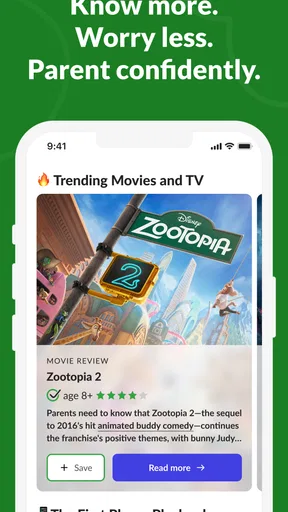
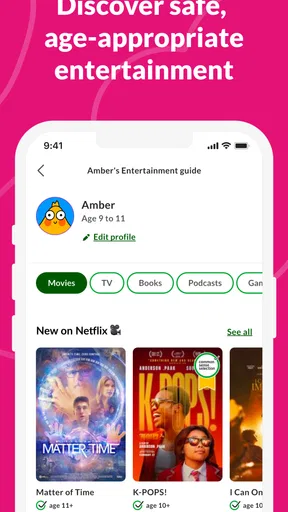
The app’s design is user-friendly, with simple navigation that even my tech-averse aunt could handle. The home screen features a variety of categories: Movies, TV Shows, Books, Apps, and Games. Each section is packed with reviews and ratings that are easy to sift through. It’s like having a personal critic who's done all the hard work for you.
The search functionality is robust. I tested it with a few popular titles and some obscure ones, and the app returned results faster than you can say "binge-watch." You can filter results by age, genre, and more, making it super easy to find what’s appropriate for different age groups.
Content Quality
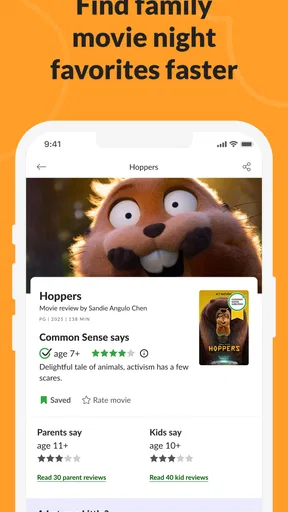
Now, onto the meat of the app—the reviews. Each review is detailed, covering everything from the plot and themes to the language and consumerism aspects. What impressed me the most is the depth of analysis. It’s not just "this movie is great" or "this game is fun." Instead, you get a thorough breakdown that helps you understand whether something is suitable for your family.
One of the standout features is the "What Parents Need to Know" section. This part of the review gives you the lowdown on any potentially questionable content. It’s like a cheat sheet for parents who want to be in the know without having to pre-screen everything themselves.
Community and Educational Value
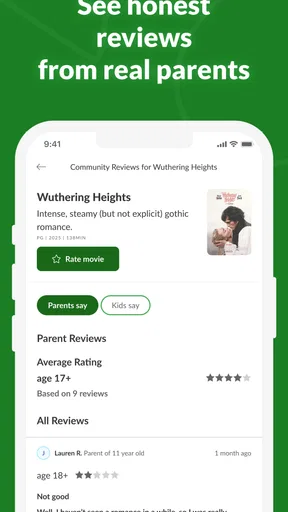
Another fantastic aspect is the community features. Users can leave their own reviews and ratings, providing a diverse range of opinions. This adds an extra layer of trustworthiness to the app, as you’re not just relying on one source for information.
Moreover, Common Sense Media doesn’t just stop at reviews. They offer educational resources and advice on parenting in the digital age. It’s a holistic approach that not only informs but also educates. It’s like having a parenting guide right in your pocket.
Personal Experience
So, how did it fare in my own life? I used it to vet a few apps and games for my younger cousins. The recommendations were spot-on. We ended up with a list of apps that were both educational and fun. Seeing their excitement and knowing they were engaging with safe content was super rewarding.
Plus, I even found a few movies and shows for myself that I probably wouldn’t have stumbled upon otherwise. It’s a win-win for everyone.
Final Thoughts
In this fast-paced digital world, having a reliable resource like Common Sense Media is invaluable. It’s more than just an app; it’s a tool for making informed decisions about digital content. Whether you’re a parent, a caregiver, or just someone who values quality content, this app is a must-have.
So, go ahead, give it a try. Dive into the world of Common Sense Media and let it simplify your digital life. Trust me, you won’t be disappointed.
The app is currently at version 1.11.0, and the confirmed release date is September 12, 2023. That gives existing users a concrete point of reference for the version they may encounter, but a version number by itself does not tell me what changed between releases. I would not assume that an update introduced a particular feature or altered the review process without seeing that change in the app. For someone already using it, the sensible approach is to judge the current experience by whether the title search and guidance meet the family’s needs today, rather than infer a history of improvements from the version label.
A useful way to make the guidance personal
One small workflow makes review notes more actionable: before searching, decide what you are trying to avoid or understand. A caregiver might be especially concerned about frightening scenes, while another wants context for language or a theme that could prompt questions. Reading with one specific concern in mind is more efficient than treating every line as equally important, and it helps prevent a general review from becoming a rigid checklist.
For families with siblings at different stages, I would make the decision for the youngest or most sensitive viewer first, then consider whether an older child can watch separately or with an adult. This avoids the common trap of choosing solely for the oldest child and discovering too late that the same material lands very differently with a younger one. The app can support that discussion, but the final call still belongs to the adults who know the children.
Questions worth asking before relying on it
Can it replace watching a title in advance? I would not use it that way for a child with a strong, specific trigger or for a family that needs certainty about every scene. A written review is useful context, not a personal screening of the exact viewing experience. If the stakes are high, pre-screening or choosing a familiar alternative is the safer option.
Is it only for parents? Its main value is family decision-making, but a caregiver, relative, or adult who helps select shared viewing can use the same guidance. Does it decide what is appropriate? No single review can do that for every household; it helps surface considerations so you can apply your own standards. And if you simply want to discover what is available on a particular streaming platform, that platform’s own browsing tools are likely the quicker place to start.
There is also a cost detail to keep in mind: while the app is free to install, it includes optional in-app purchases priced from $3.99 to $39.99 per item. I would check the purchase prompt carefully rather than assume every extra resource or option is included at no cost. That does not change the usefulness of the free starting point, but it is relevant for families who want to avoid unexpected spending.
What I would watch for over time
For current users, the most meaningful sign of progress is not a higher version number on its own but whether the app continues to make its reviews easy to find and practical to apply. I would pay attention to whether searching for titles your family actually encounters feels straightforward, whether the guidance answers your main concern, and whether community opinions add perspective without crowding out the editorial review.
My overall view is that this is a helpful companion for making considered choices, particularly when a family is balancing different ages and sensitivities. It is not a streaming guide, a promise that every recommendation will suit your child, or a replacement for parental judgment. Used as a focused second opinion before movie night, though, it can turn a rushed guess into a more deliberate choice—and that is a worthwhile reason to keep it handy.
Pros
- User-friendly interface for easy navigation.
- Comprehensive reviews for various media types.
- In-depth age-appropriateness ratings.
- Regular content updates and additions.
- Parental tips and discussion guides.
Cons
- Limited international media coverage.
- Some content requires a subscription.
- Ads may be intrusive for free users.
- Not all media have detailed reviews.
- Age ratings may vary by region.
FAQs for Common Sense Media
What is Common Sense Media, and how does it work?
Common Sense Media is a platform that provides detailed reviews and ratings for movies, TV shows, apps, books, and games, aimed at helping parents make informed decisions about what their children consume. The app evaluates content based on age-appropriateness, educational value, and potential for positive messages, ensuring families can select suitable entertainment.
Is Common Sense Media free to use?
Yes, Common Sense Media offers many of its features for free, including access to a wide range of reviews and ratings. However, the platform also provides a premium membership option, Common Sense Media Plus, which includes additional benefits such as ad-free browsing and personalized recommendations, enhancing user experience.
How reliable are the reviews on Common Sense Media?
The reviews on Common Sense Media are crafted by trained reviewers and educators who assess content based on several criteria such as age-appropriateness and educational value. The platform also incorporates community reviews, allowing parents to share their experiences, thus offering a comprehensive view of the content's impact.
Can I use Common Sense Media to set parental controls?
While Common Sense Media itself does not offer parental control features, it provides valuable information and recommendations that can help parents set up appropriate restrictions on their children’s devices. The app guides users on selecting content that aligns with their family's values and standards.
How does Common Sense Media handle data privacy?
Common Sense Media is committed to protecting user privacy and data. The app collects minimal personal information, primarily for account creation and personalization of content. They also provide a detailed privacy policy, ensuring transparency about how data is collected, used, and stored, thus maintaining user trust.


